Validate AEM Dispatcher Locally Like Cloud Manager
Dispatcher acts as the first enforcement layer in most AEM projects, handling domain routing, request filtering, and early validation before traffic reaches AEM Publish.
To verify this behavior locally and catch configuration issues early, AEM as a Cloud Service provides Dispatcher Tools through the AEM SDK. These tools allow Dispatcher configuration to be validated in an environment that mirrors Cloud Manager checks.
This guide walks through setting up the SDK, running local validation, and understanding how domain mapping affects Dispatcher behavior. For detailed SDK installation steps, refer to:
Setting Up AEM SDK and Local Environment
Preparing Local Dispatcher Validation with the AEM SDK
Download the latest AEM SDK from Adobe’s Software Distribution portal to mirror Cloud Manager locally and validate configurations with the most recent release.
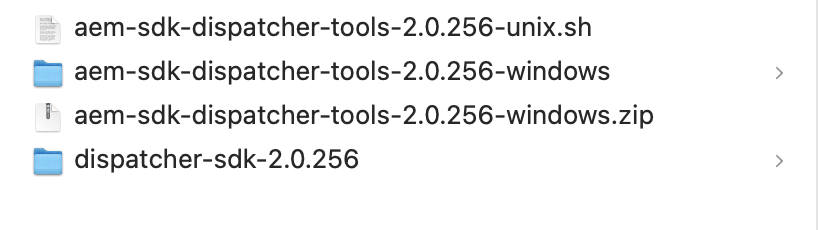
After extracting the SDK, platform-specific validation scripts become available.
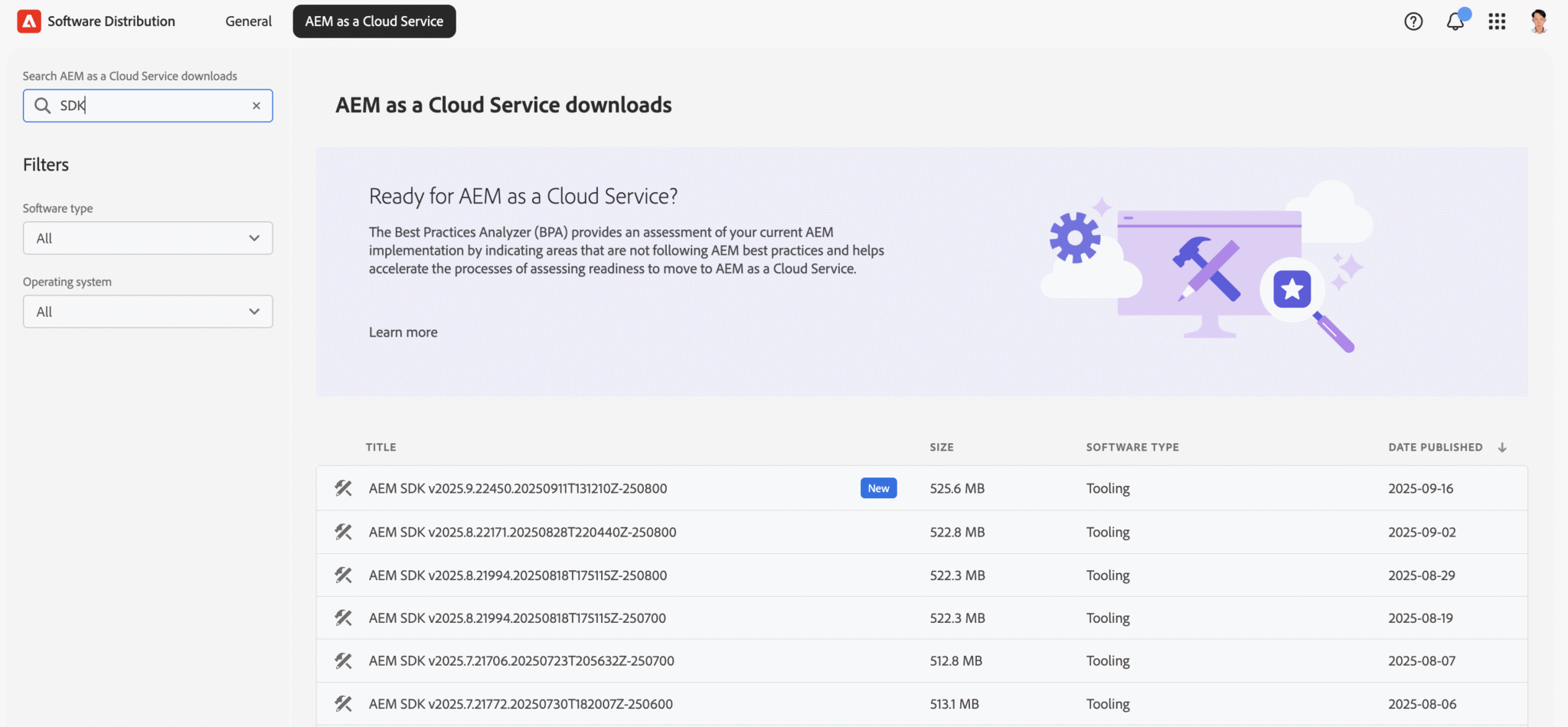
Example below shows how validation is executed on macOS or Linux.
chmod +x aem-sdk-dispatcher-tools-2.0.256-unix.sh
./aem-sdk-dispatcher-tools-2.0.256-unix.shWindows: unzip the package and follow the included README — no shell commands required.
Inside the Dispatcher SDK you will find the bin/, docs/, lib/, and src/ folders. These give you the scripts, documentation, validator tools, and images you need to validate your configs and run Cloud Manager-style checks locally.
Example tree (for orientation):
dispatcher-sdk-2.0.256 % tree
.
├── README
├── bin
│   ├── docker_immutability_check.sh
│   ├── docker_run.sh
│   ├── docker_run_hot_reload.sh
│   ├── update_maven.sh
│   ├── validate.sh
│   ├── validator -> ./validator-darwin-arm64
│   ├── validator-darwin-arm64
│   └── validator-linux-arm64
├── docs
│   ├── README.html
│   ├── TransitionFromAMS.html
│   ├── TroubleShooting.html
│   └── Validator.html
├── lib
│   ├── configuration_reloading.sh
│   ├── dispatcher-publish-amd64.tar.gz
│   ├── dispatcher-publish-arm64.tar.gz
│   ├── dummy_gitinit_metadata.sh
│   ├── httpd-reload-monitor
│   ├── httpd-vhosts
│   ├── immutability_check.sh
│   ├── import_sdk_config.sh
│   └── overwrite_cache_invalidation.sh
└── srcThese SDK files must be copied into the project dispatcher/ folder to enable local validation.
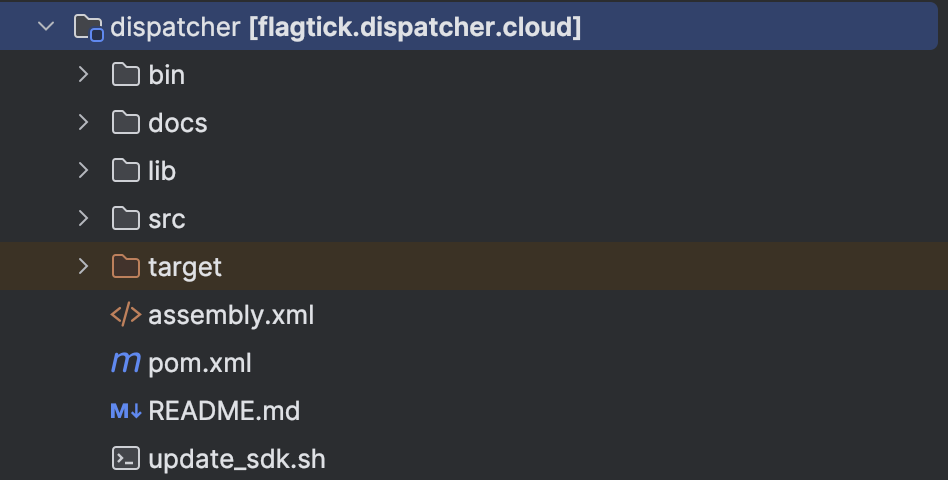
With SDK files in place, validation can be executed from the dispatcher module.
cd dispatcher
./bin/validate.sh srcValidator checks align directly with supported domain routing models.
- Static rule checks
- Apache/Dispatcher syntax checks (inside Docker)
- Immutable-file parity checks
When prompted: “Do you want to update the immutable files?”
- yes → updates baseline immutable files (use when upgrading SDK)
- no → keeps your current baseline (use for regular validation)
Tip: Use yes only during planned upgrades. For normal day-to-day validation, choose no.
Domain Mapping Models: Cloud Manager vs Dispatcher
Model 1: Domain Mapped in Adobe Cloud Manager (AEMaaCS)
First domain model applies when Cloud Manager handles domain mapping before requests reach Dispatcher.
Adobe’s CDN normalizes the incoming Host header before passing the request to Dispatcher.
Therefore, your vhost only needs a generic “accept everything” configuration:
ServerName  "publish"
ServerAlias "*"
DocumentRoot "${DOCROOT}"Explanation (short & clear):
- ServerName “publish” → internal identifier only — never matched against real domains.
- ServerAlias “*” → accept all domains because Cloud Manager/CDN has already normalized the traffic.
- DocumentRoot “${DOCROOT}” → must point to your standard publish DocumentRoot.
Under this model, following domains are supported automatically:
portaldev.flagtick.comportalstg.flagtick.comportal.flagtick.com
Use this pattern when Cloud Manager manages your domain.
It keeps Dispatcher configuration simple and avoids Phase-1 validation errors.

Second model applies when DNS routes traffic directly to Dispatcher.
In this model, Dispatcher — not Cloud Manager — receives the real domain, because DNS resolves the domain straight to the Dispatcher’s IP.
This means the Dispatcher must match the domain explicitly in its vhost:
ServerName portaldev.flagtick.com
ServerAlias portaldev.flagtick.local
ServerAlias flagtick.cloud

DocumentRoot "${DOCROOT}"Under direct routing, explicit domain matching becomes required.
- Dispatcher receives the raw
Hostheader - No CDN or Cloud Manager to normalize domains
- Dispatcher must decide which vhost/farm to use based on the exact hostname
- Any host not listed here → falls back to default vhost or returns 404
This ensures correct:
- environment separation (DEV/STG/PROD)
- farm selection
- filter rules
- caching behavior

Table below highlights operational differences between these two domain models.
| Feature | Cloud Manager (AEMaaCS) | Dispatcher-mapped (On-prem/AMS/Local) |
|---|---|---|
| Who maps the domain? | Adobe CDN | Dispatcher |
| vhost pattern | ServerAlias “*” | ServerName real-domain.com |
| Dispatcher matches Host header? | No | Yes |
| CDN present? | Always | Not required |
| Used for | DEV/STAGE/PROD AEM Cloud | On-prem/AMS/Local Dispatcher/AEM Cloud |
Important: Adobe CDN ≠ Dispatcher.
CDN handles global edge routing, TLS, domain mapping, WAF, and caching.
Dispatcher handles Apache routing, filtering, and AEM publish caching.
Dispatcher Validator Phases and Failure Resolution
Before running the validator, first confirm which domain-mapping model your project uses
(Cloud Manager → wildcard vhost, or DNS → explicit domain vhost).
This determines the correct vhost pattern:
- Cloud Manager / CDN model →
ServerAlias "*" - DNS → Dispatcher model →
ServerName real-domain.com
This section shows how the validator works, common failures, and the quickest way to fix them.
Before running validation, perform following pre-checks.
cd dispatcher

# vhost symlinks must exist
ls -la src/conf.d/enabled_vhosts

# farm symlinks must exist
ls -la src/conf.dispatcher.d/enabled_farms

# check Apache syntax before Docker runs it
httpd -t   # or apachectl -t

# confirm AEM Publish is reachable
curl -I http://host.docker.internal:4503 || curl -I http://localhost:4503Example below shows vhost pattern used when Cloud Manager performs domain mapping.
(You can name the file flagtick.vhost, default.vhost, wknd.vhost, etc.—the filename doesn’t matter in Case 1.)
# Include customer defined variables
Include conf.d/variables/custom.vars

<VirtualHost *:80>
    ServerName	"publish"
    # Put names of which domains are used for your published site/content here
    ServerAlias	 "*"
    # Use a document root that matches the one in conf.dispatcher.d/default.farm
    DocumentRoot "${DOCROOT}"
    # URI dereferencing algorithm is applied at Sling's level, do not decode parameters here
    AllowEncodedSlashes NoDecode
    # Add header breadcrumbs for help in troubleshooting
    <IfModule mod_headers.c>
        Header add X-Vhost "publish"
    </IfModule>
    <Directory />
        <IfModule disp_apache2.c>
            # Some items cache with the wrong mime type
            # Use this option to use the name to auto-detect mime types when cached improperly
            ModMimeUsePathInfo On
            # Use this option to avoid cache poisioning
            # Sling will return /content/image.jpg as well as /content/image.jpg/ but apache can't search /content/image.jpg/ as a file
            # Apache will treat that like a directory.  This assures the last slash is never stored in cache
            DirectorySlash Off
            # Enable the dispatcher file handler for apache to fetch files from AEM
            SetHandler dispatcher-handler
        </IfModule>
        Options FollowSymLinks
        AllowOverride None
        # Insert filter
        SetOutputFilter DEFLATE
        # Don't compress images
        SetEnvIfNoCase Request_URI \.(?:gif|jpe?g|png)$ no-gzip dont-vary
        # Prevent clickjacking
        Header always append X-Frame-Options SAMEORIGIN
    </Directory>
    <Directory "${DOCROOT}">
        AllowOverride None
        Require all granted
    </Directory>
    <IfModule disp_apache2.c>
        # Enabled to allow rewrites to take affect and not be ignored by the dispatcher module
        DispatcherUseProcessedURL	On
        # Default setting to allow all errors to come from the aem instance
        DispatcherPassError		0
    </IfModule>
    <IfModule mod_rewrite.c>
        RewriteEngine	on
        Include conf.d/rewrites/rewrite.rules

        RewriteCond %{HTTP:X-Forwarded-Proto} !https
        RewriteCond %{REQUEST_URI} !^/dispatcher/invalidate.cache
        RewriteRule (.*) https://%{HTTP_HOST}%{REQUEST_URI} [L,R=301]

        # Rewrite index page internally, pass through (PT)
        RewriteRule "^(/?)$" "/index.html" [PT]

    </IfModule>
</VirtualHost>Rewrite rules align with selected domain model, as shown below.
#
# CUHK Dispatcher Rewrite Rules (dynamic with CONTENT_FOLDER_NAME)
#

# Always include Adobe’s default rules
Include conf.d/rewrites/default_rewrite.rules

# make sure the root site redirects are cache on CDN to avoid origin round-trip
Header always set Cache-Control "max-age=300,stale-while-revalidate=43200,stale-if-error=43200" env=cdncache

# --- Shorten URLs ---
RewriteCond %{REQUEST_URI} ^/?$
RewriteCond %{HTTP:X-Forwarded-Proto} ^$
RewriteRule ^(/)$ /us/en.html [R=301,L,E=cdncache]

RewriteCond %{REQUEST_URI} ^/?$
RewriteRule ^(/)$ %{HTTP:X-Forwarded-Proto}://%{HTTP_HOST}/us/en.html [R=301,L,E=cdncache]

# --- Favicon mapping ---
RewriteRule ^/favicon.ico$ /content/dam/${CONTENT_FOLDER_NAME}/icons/favicon.ico [NC,PT]

# --- Restrict unsafe paths ---
RewriteCond %{REQUEST_URI} !^/apps
RewriteCond %{REQUEST_URI} !^/bin
RewriteCond %{REQUEST_URI} !^/content
RewriteCond %{REQUEST_URI} !^/etc
RewriteCond %{REQUEST_URI} !^/home
RewriteCond %{REQUEST_URI} !^/libs
RewriteCond %{REQUEST_URI} !^/system
RewriteCond %{REQUEST_URI} !^/tmp
RewriteCond %{REQUEST_URI} !^/var
RewriteCond %{REQUEST_URI} (.html|.jpe?g|.png|.mp4|.svg)$
RewriteRule ^/(.*)$ /content/${CONTENT_FOLDER_NAME}/$1 [PT,L]In contrast, example below shows vhost configuration for Dispatcher-mapped domains.
## FlagTick DEV Publish virtual host
<VirtualHost *:80>
    AllowEncodedSlashes On

    ## Primary hostname for FlagTick DEV publish
    ServerName    portaldev.flagtick.com
    ServerAlias   portaldev.flagtick.local
    ServerAlias   flagtick.cloud

    ## Dispatcher document root
    DocumentRoot ${DOCROOT}

    <IfModule mod_headers.c>
        Header always add X-Vhost "flagtick-publish-dev"
        Header merge X-Frame-Options SAMEORIGIN "expr=%{resp:X-Frame-Options}!='SAMEORIGIN'"
        Header merge X-Content-Type-Options nosniff "expr=%{resp:X-Content-Type-Options}!='nosniff'"
        Header set Permissions-Policy "browsing-topics=()"
    </IfModule>

    <Directory />
        <IfModule disp_apache2.c>
            ModMimeUsePathInfo On
            DirectorySlash Off
            SetHandler dispatcher-handler
        </IfModule>
        Options FollowSymLinks
        AllowOverride None
    </Directory>

    <Directory "${DOCROOT}">
        AllowOverride None
        Require all granted
    </Directory>

    <IfModule disp_apache2.c>
        DispatcherUseProcessedURL 1
        DispatcherPassError  0
    </IfModule>

    <IfModule mod_rewrite.c>
        RewriteEngine on

        ## Enforce HTTPS
        RewriteCond %{HTTP:X-Forwarded-Proto} !https
        RewriteCond %{REQUEST_URI} !^/dispatcher/invalidate.cache
        RewriteRule (.*) https://%{SERVER_NAME}%{REQUEST_URI} [L,R=301]

        ## Project-specific rewrites
        Include conf.d/rewrites/flagtick_301_rewrite.rules
        Include conf.d/rewrites/portal_dev_rewrite.rules
        Include conf.d/rewrites/rewrite.rules
    </IfModule>
</VirtualHost>After configuration is defined, vhost and farm symlinks must be enabled.
# enable vhost
ln -s ../available_vhosts/flagtick.vhost \
      src/conf.d/enabled_vhosts/flagtick.vhost

# enable farm (Dispatcher-mapped domains)
ln -s ../available_farms/portal_dev_publish.farm \
src/conf.dispatcher.d/enabled_farms/portal_dev_publish.farmAdd host entry:
127.0.0.1 portaldev.flagtick.localOnce local mappings are configured, access application using following URLs.
- Local Author (4502):
http://portaldev.flagtick.local:4502/ - Local Publish (4503):
http://portaldev.flagtick.local:4503/ - Dispatcher SDK (8080/8081):
http://portaldev.flagtick.local:8081/
By grouping vhosts, farms, rewrites, and SDK tools consistently, each environment can be verified in isolation using the Dispatcher SDK or Docker — exactly like Cloud Manager does.
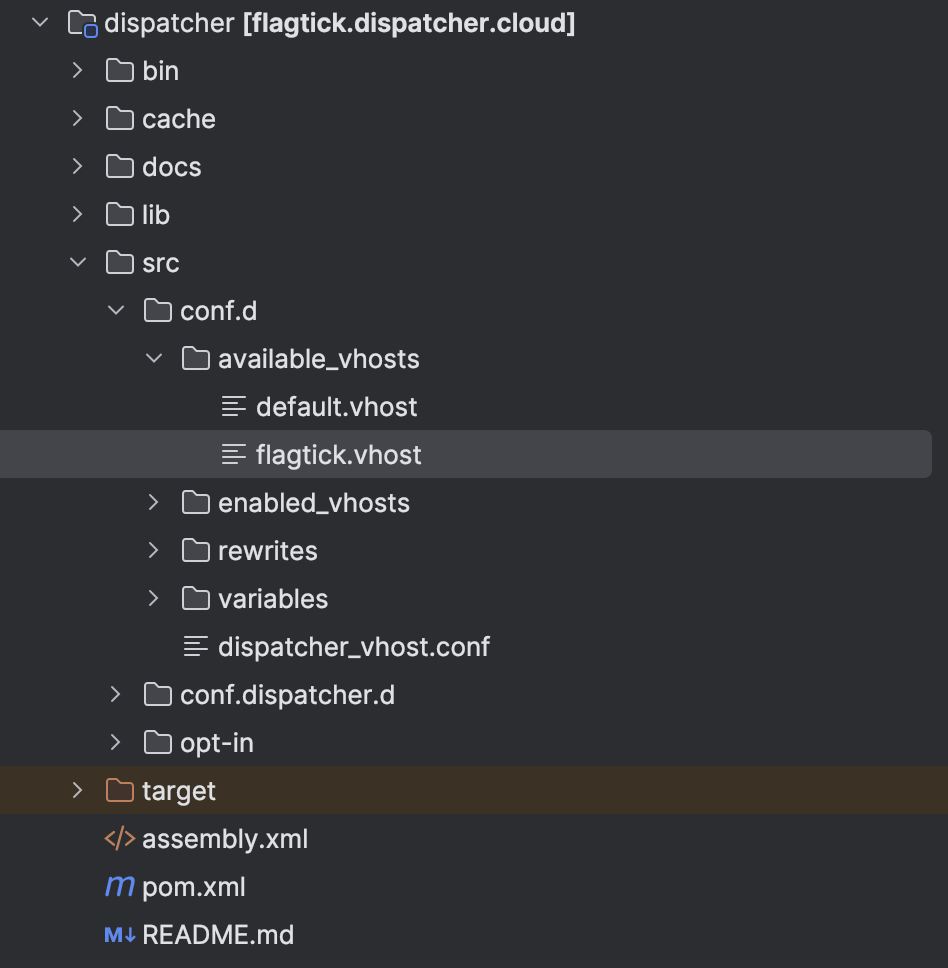
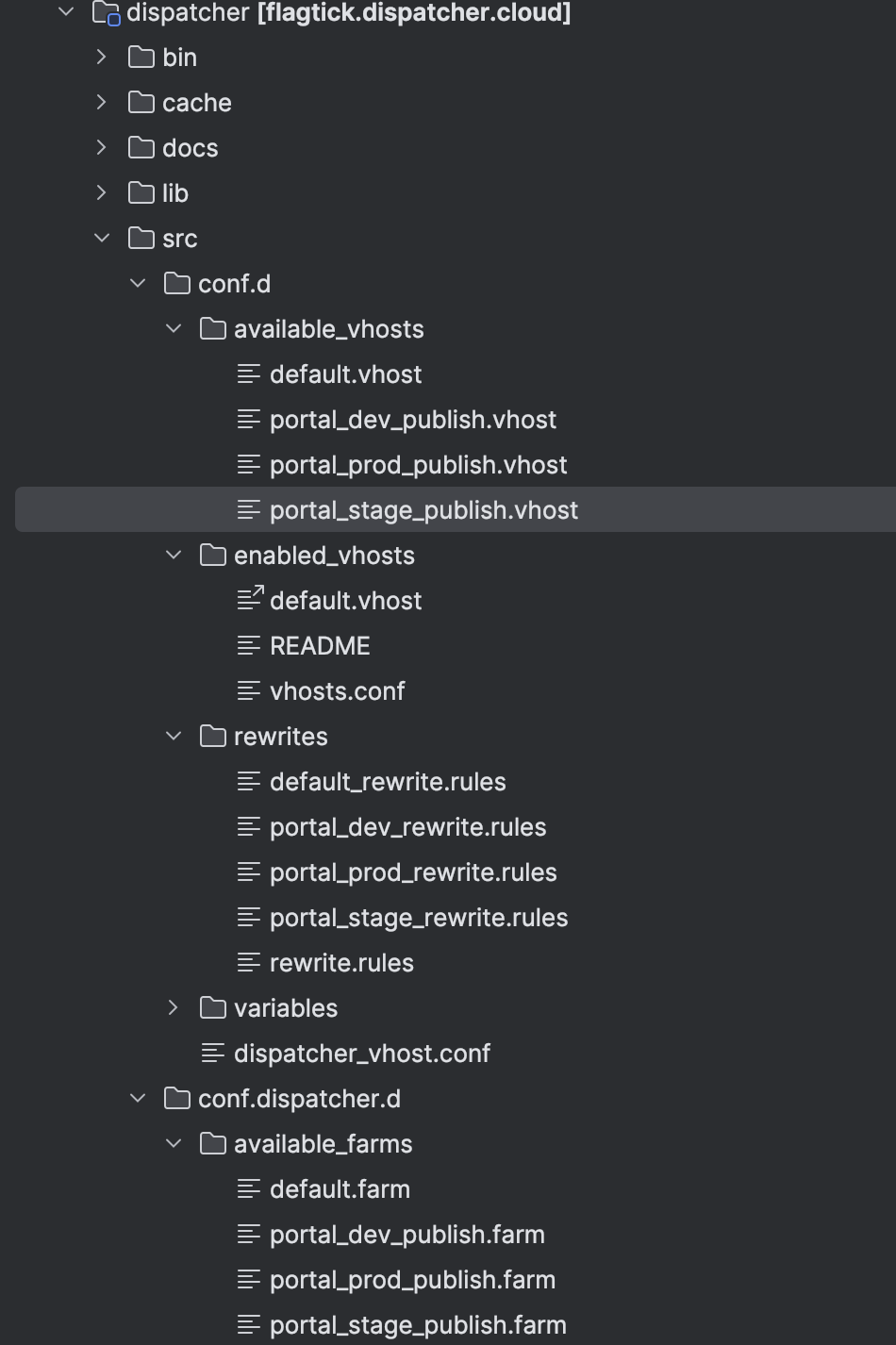
One of the most frequent Phase-1 errors happens when the validator can’t find any .vhost files inside conf.d/enabled_vhosts.
./bin/validate.sh src
Phase 1: Dispatcher validator
Error: no .vhost files found in conf.d/enabled_vhosts/
Warning: ignoreUrlParameters not set in farm (marketing params recommended)
Phase 1 failedFix:
ln -s ../available_vhosts/default.vhost src/conf.d/enabled_vhosts/default.vhostValidate Apache syntax before retry:
httpd -tOn macOS, edit /etc/apache2/httpd.conf to fix the warning “Could not reliably determine the server’s fully qualified domain name” by adding:
ServerName localhostNext, install and start Docker so you can validate your Dispatcher config in a Cloud Manager-equivalent environment:
Load the Dispatcher image:
cd ../dispatcher/lib
docker load -i dispatcher-publish-arm64.tar.gzConfirm the image:
% docker images
REPOSITORY                        TAG       IMAGE ID       CREATED       SIZE
adobe/aem-cs/dispatcher-publish 2.0.256 86f18dd3966f 6 weeks ago 149MBStart the Dispatcher container:
cd dispatcher
mkdir out
cp -R src/* out/
./bin/docker_run.sh out host.docker.internal:4503 8080

or
./bin/validator full -d out src
./bin/docker_run.sh out host.docker.internal:4503 8080 If Dispatcher cannot reach AEM Publish on port 4503, the script repeats:
%./bin/validator full -d out src
%./bin/docker_run.sh out host.docker.internal:4503 8080
Darwin MacBook-Pro-cua-Vuong.local 24.6.0 Darwin Kernel Version 24.6.0: Mon Jul 14 11:30:40 PDT 2025; root:xnu-11417.140.69~1/RELEASE_ARM64_T8132 arm64
/bin/zsh
Running script /docker_entrypoint.d/05-display-image-version.sh
...
...
Waiting until port 4503 on host.docker.internal is available (with timeout of 1s)
Sleeping for 5s to wait until port 4503 on host.docker.internal is available
Sleeping for 5s to wait until port 4503 on host.docker.internal is availableIf port 8080 is blocked:
docker ps
docker kill <id>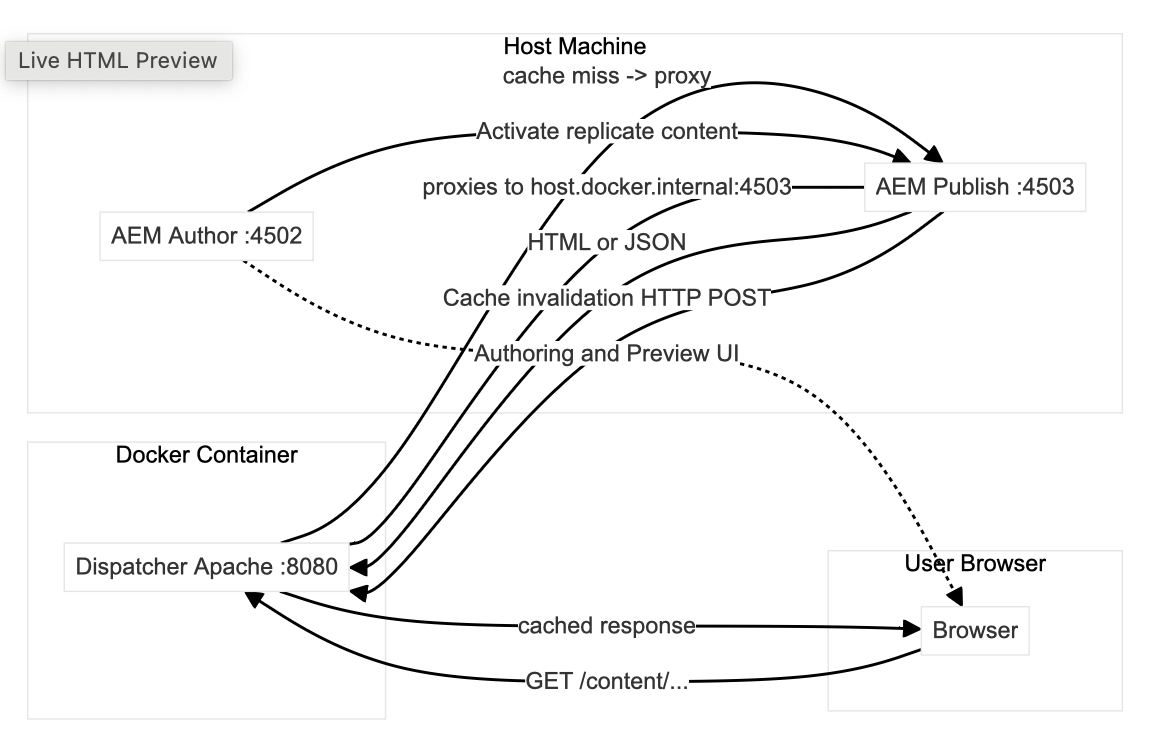
Update .gitignore for SDK folders
# dispatcher-sdk
dispatcher/lib
dispatcher/docs
dispatcher/bin
dispatcher/cache
dispatcher/outProxy or Redirect? Deciding How Traffic Flows
When a request enters AEM Cloud, it always reaches the Edge Layer (Adobe CDN / Cloud Manager) first.
At this point, the edge decides how the traffic should flow:
1. Select Origin — use AEM as the backend
The request is forwarded inside AEM Cloud to your Dispatcher → AEM Publish. There is no client-side redirect. Routing, filtering, and content delivery are handled entirely by AEM.
This option is used when:
- You want AEM/Dispatcher caching and filters to apply
- The request should be processed by AEM
- The content lives under
/content/...
2. Redirect (301) — stop at the edge
The edge does not forward to AEM. Instead, it returns a 301 redirect immediately to send the browser to a new URL.
This is a very fast, infrastructure-level redirect executed before Dispatcher or AEM publish receive the request.
Use this when:
- A domain should redirect to a new primary domain
- You want to keep AEM completely out of the request path
- SEO-friendly permanent redirects are required
How the decision works
User → AEM Cloud Edge (Decision Point)
        → Option A: Forward to Dispatcher / AEM (Select Origin)
→ Option B: Redirect the user elsewhere (301 Redirect)Code block below demonstrates Select Origin configuration in practice.
# --- Origin Selector (reverse-proxy external backend) ---
# Keep static & internal paths local; proxy everything else to backend.
# Safety checks (do not proxy internal AEM paths)
RewriteCond %{REQUEST_URI} !^/content/dam [NC]
RewriteCond %{REQUEST_URI} !^/conf [NC]
RewriteCond %{REQUEST_URI} !^/apps [NC]
RewriteCond %{REQUEST_URI} !^/etc.clientlibs [NC]
RewriteCond %{REQUEST_URI} !^/aem/graphiql [NC]
RewriteCond %{REQUEST_URI} !^/404$ [NC]

# Proxy to external origin (no client redirect)
RewriteRule ^/(.*)$ http://http://httpbin.org/$1 [P,L]

# Keep backend redirects working for clients
ProxyPassReverse / http://http://httpbin.org/📘 Reference: Adobe AEM Cloud Service — Configuring Traffic at the CDN
https://experienceleague.adobe.com/en/docs/experience-manager-cloud-service/content/implementing/content-delivery/cdn-configuring-traffic
During local testing, HTTPS enforcement may need to be disabled temporarily.
In your .vhost file:
<IfModule mod_rewrite.c>
    RewriteEngine on

    # Disable HTTPS enforcement locally
    # RewriteCond %{HTTP:X-Forwarded-Proto} !https
    RewriteCond %{REQUEST_URI} !^/dispatcher/invalidate.cache
    # RewriteRule (.*) https://%{SERVER_NAME}%{REQUEST_URI} [L,R=301]

    # Project rewrites
    Include conf.d/rewrites/flagtick_301_rewrite.rules
    Include conf.d/rewrites/portal_dev_rewrite.rules
    Include conf.d/rewrites/rewrite.rules
</IfModule>Note: If your local Dispatcher proxies to an HTTPS backend, configure Apache SSL modules; otherwise, you may see 500 Internal Server Error when reverse-proxying.
For local testing, using HTTP backends is usually simplest.
Request flow can be verified using curl.
 % curl -v portaldev.flagtick.local:8080/test-proxy/

* Host portaldev.flagtick.local:8080 was resolved.
* IPv6: (none)
* IPv4: 127.0.0.1, 127.0.0.1
*   Trying 127.0.0.1:8080...
* Connected to portaldev.flagtick.local (127.0.0.1) port 8085
> GET /online/ HTTP/1.1
> Host: portaldev.flagtick.local:8080
> User-Agent: curl/8.7.1
> Accept: */*
>
* Request completely sent off
< HTTP/1.1 200 OK
< Date: Sun, 23 Nov 2025 15:20:21 GMT
< Server: Apache/2.4.62 ()
< X-Vhost: cuhk-publish-dev
< Last-Modified: Wed, 29 Jun 2022 00:23:22 GMT
< ETag: "8be-5e28b29291e10"
< Accept-Ranges: bytes
< Content-Length: 2238
< Vary: Accept-Encoding
< Content-Type: text/html; charset=UTF-8
< Cache-Control: max-age=300
< Expires: Sun, 23 Nov 2025 15:25:20 GMT
< X-Frame-Options: SAMEORIGIN
< X-Content-Type-Options: nosniff
< Permissions-Policy: browsing-topics=()
<
<html>
        <head>
                <title>NeverSSL - helping you get online</title>
.... (DOM of http://neverssl.com/online/)Before deploying to AEM Cloud, Cloud Manager validation behavior must be considered.
# --- Origin Selector (reverse-proxy external backend) ---
RewriteEngine On
RewriteRule ^/test-proxy(?:/(.*))?$ http://httpbin.org/$1 [P,L]
ProxyPassReverse /anything/abc/ http://httpbin.org/Similarly, the 301 redirect pattern below should not be used, as it may lead to issues in Adobe Cloud:
# Fallback: redirect everything NOT in whitelist to backend (make sure these conditions match your whitelist exactly)
RewriteCond %{REQUEST_URI} !^/content/dam [NC]
RewriteCond %{REQUEST_URI} !^/conf [NC]
RewriteCond %{REQUEST_URI} !^/apps [NC]
RewriteCond %{REQUEST_URI} !^/etc.clientlibs [NC]
RewriteCond %{REQUEST_URI} !^/aem/graphiql [NC]
RewriteCond %{REQUEST_URI} !^/(en|tc|sc) [NC]
RewriteCond %{REQUEST_URI} !^/404$ [NC]
RewriteRule ^/(.*)$ http://httpbin.org/$1 [R=302,L]We will use:
# Fallback: redirect everything NOT in whitelist to backend (make sure these conditions match your whitelist exactly)
RewriteRule ^/anything/redirect301(?:/(.*))?$ http://httpbin.org/anything/redirect301/$1 [R=302,L]Using WKND to Validate Dispatcher Configuration
With Dispatcher running, the next step is to add real content — Adobe’s WKND site provides a complete AEM structure out of the box.
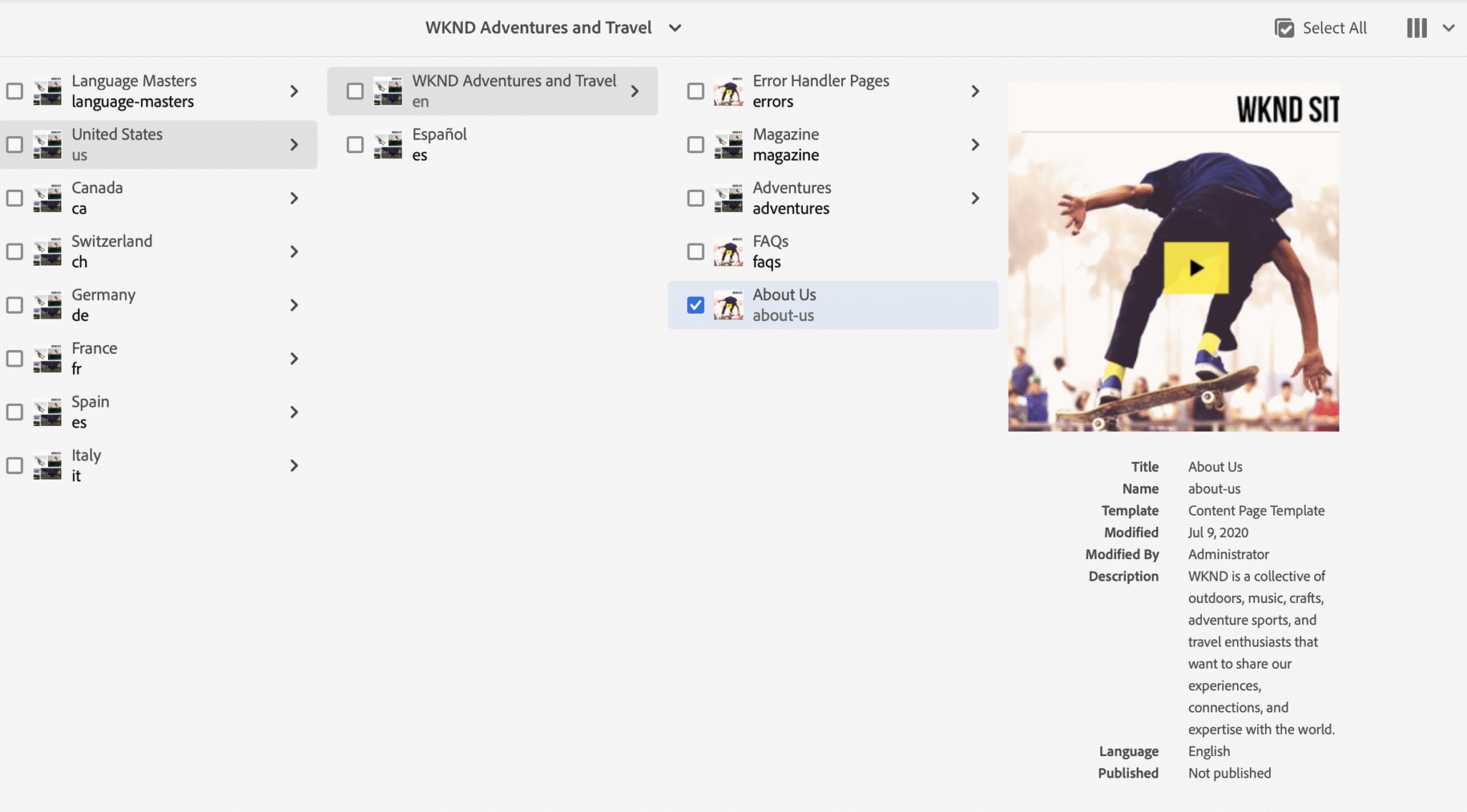
Note: If you are running Java 11 locally, use the WKND 3.2.0 release (for example, aem-guides-wknd.all-3.2.0.zip). For Java 21, you can install the latest WKND from Adobe’s GitHub: aem-guides-wknd
[INFO] ------------------------------------------------------------------------
[INFO] Reactor Summary for WKND Sites Project - Reactor Project 3.2.0:
[INFO]
[INFO] WKND Sites Project - Reactor Project ............... SUCCESS [  0.726 s]
[INFO] WKND Sites Project - Core .......................... SUCCESS [ 38.908 s]
[INFO] WKND Sites Project - UI Frontend ................... SUCCESS [ 38.375 s]
[INFO] WKND Sites Project - UI apps structure ............. SUCCESS [  1.040 s]
[INFO] WKND Sites Project - UI apps ....................... SUCCESS [  4.041 s]
[INFO] WKND Sites Project - UI content .................... SUCCESS [  1.411 s]
[INFO] WKND Sites Project - UI config ..................... SUCCESS [  0.162 s]
[INFO] WKND Sites Project - UI sample content ............. SUCCESS [  0.816 s]
[INFO] WKND Sites Project - All ........................... SUCCESS [ 42.472 s]
[INFO] WKND Sites Project - Integration Tests ............. SUCCESS [ 26.077 s]
[INFO] WKND Sites Project - Dispatcher .................... SUCCESS [  0.564 s]
[INFO] WKND Sites Project - UI Tests ...................... SUCCESS [  0.347 s]
[INFO] ------------------------------------------------------------------------
[INFO] BUILD SUCCESS
[INFO] ------------------------------------------------------------------------
[INFO] Total time:  02:47 min
[INFO] Finished at: 2025-09-27T21:19:01+07:00Next, copy the Dispatcher configuration from your custom project into the WKND setup, then update rewrite.rules to point the default page to portaldev.flagtick.local.
WKND installation demonstrates how root mappings are applied on AEM Publish.
// RootMappingServlet.cfg.json
{
    "rootmapping.target": "/content/wknd/us/en.html"
}

// rewrite.rules
# rewrite for root redirect
RewriteRule ^/?$ /content/${CONTENT_FOLDER_NAME}/us/en.html [PT,L]For redirecting to login.html, the configuration should be set up like this
// RootMappingServlet.cfg.json
{
    "rootmapping.target": "/content/<project>/us/login.html"
}

// rewrite.rules
# Map the root folder to the login page
RewriteRule ^/?$ /content/<project>/us/login.html [PT,L]That is why we copy our project’s Dispatcher configuration into WKND and update rewrite.rules — ensuring that hitting http://portaldev.flagtick.local:8080/ also goes to the intended homepage.
It is important to understand where different types of redirects should live. AEM itself is responsible for content-driven routing (like site root or language mapping), while Dispatcher is better suited for infrastructure-level redirects (like forcing HTTPS or handling domain aliases).
If redirect is business/content logic → do it in AEM
/etc/map.publish- Sling Resource Resolver
- Redirect Map Manager (ACS Commons, etc.)
If redirect is infra/domain routing → do it in Dispatcher
- e.g., force HTTPS, remove
www, vanity domain to homepage
With Dispatcher running locally, final validation can be performed.
First, hit the Dispatcher root — a 200 OK confirms it’s proxying to Publish.
curl -v http://portaldev.flagtick.local:8080/

* Host portaldev.flagtick.local:8080 was resolved.
* IPv6: (none)
* IPv4: 127.0.0.1, 127.0.0.1
*   Trying 127.0.0.1:8080...
* Connected to portaldev.flagtick.local (127.0.0.1) port 8080
> GET / HTTP/1.1
> Host: portaldev.flagtick.local:8080
> User-Agent: curl/8.7.1
> Accept: */*
>
* Request completely sent off
< HTTP/1.1 200 OK
< Date: Sun, 28 Sep 2025 03:34:06 GMT
< Server: Apache
< X-Frame-Options: SAMEORIGIN
< X-Content-Type-Options: nosniff
< Last-Modified: Sun, 28 Sep 2025 01:58:38 GMT
< ETag: "1dd2d-63fd2db7ebc91"
< Accept-Ranges: bytes
< Content-Length: 122157
< Cache-Control: max-age=300
< Expires: Sun, 28 Sep 2025 03:39:06 GMT
< Vary: Accept-Encoding
< X-Vhost: publish
< Content-Type: text/html;charset=utf-8
<
<!DOCTYPE HTML>Add a header to show whether requests are served from cache (HIT, MISS, REFRESH).
<IfModule mod_headers.c>
    Header always add X-Vhost "flagtick-publish-dev"
    Header merge X-Frame-Options SAMEORIGIN "expr=%{resp:X-Frame-Options}!='SAMEORIGIN'"
    Header merge X-Content-Type-Options nosniff "expr=%{resp:X-Content-Type-Options}!='nosniff'"
    Header set Permissions-Policy "browsing-topics=()"

    # Show Dispatcher cache state (HIT, MISS, REFRESH)
    Header add X-Cache-Status "%{DISP_CACHE_STATE}e"
</IfModule>If you want to check cache HIT or MISS in HTTP headers, note that the Local Dispatcher SDK doesn’t add this header by default — you have to configure it in Apache. Otherwise, the easiest way is to tail the log file with:
docker ps
docker exec -it <container_id> ls -l /var/log/apache2
docker exec -it <container_id> tail -f /var/log/apache2/dispatcher.log

curl -I http://portaldev.flagtick.local:8080/content/wknd/us/en.htmlIf the header isn’t available, you can always confirm caching status in the dispatcher log, which reports whether a request was served from cache (hit), fetched fresh (miss), or revalidated (refresh).
[28/Sep/2025:06:45:09 +0000] "HEAD /content/wknd/us/en.html HTTP/1.1" - hit [publishfarm/-] 8ms "portaldev.flagtick.local:8080"Wrapping up
At this stage, Dispatcher configuration aligns with Cloud Manager validation rules. Configuration was built and deployed, container ran locally, logs (dispatcher.log) checked, cache and invalidation confirmed against Publish.
Key takeaways:
- Validate rules in Docker before pushing
- Watch for HIT / MISS in headers or dispatcher.log
- Keep vhost and filter rules lean
Side note: Cloud Manager validation is stricter than local SDK defaults. Always sync local Dispatcher SDK version with Cloud Manager version to avoid surprises.
What’s next
Next article shifts focus from Dispatcher validation to authoring and frontend workflows.
You will learn how to:
- Map static HTML layouts to AEM templates and components
- Configure template types, page policies, and allowed components
- Extend core page components with custom header and footer client libraries
- Use Experience Fragments for reusable layout sections
By end, static markup produced in ui.frontend connects to editable templates in AEM—bridging design, development, and authoring in real-world setup.
👉 Continue reading: Improving AEM Front-End Development Workflow.