Why My AEM Pipeline Looked Green — Until Staging Started Failing
In practice, I have seen recurring challenges across both development and operations in AEM as a Cloud Service (AEMaaCS), especially around the assumption that a green pipeline means a safe release.
A green pipeline suggests stable code and low risk, but teams often focus only on promotion toward production, not on why the code passed earlier stages. Hence, development or staging is where hidden issues surface—problems that never appeared during local development or early pipeline runs.
This article is based on hands-on experience delivering and operating AEMaaCS in high-pressure environments, including the federal public sector. The sections below explain why pipelines look green until staging fails—and what those failures are really telling you.
Pipeline Failures Are Code Smells in Disguise
First, the title emphasizes “code smells,” familiar to most developers. Many pipeline failures signal deeper code quality problems rather than random CI/CD issues.
Below is example of Non-Production Pipeline in Cloud Manager, focused on code quality rather than deployment.
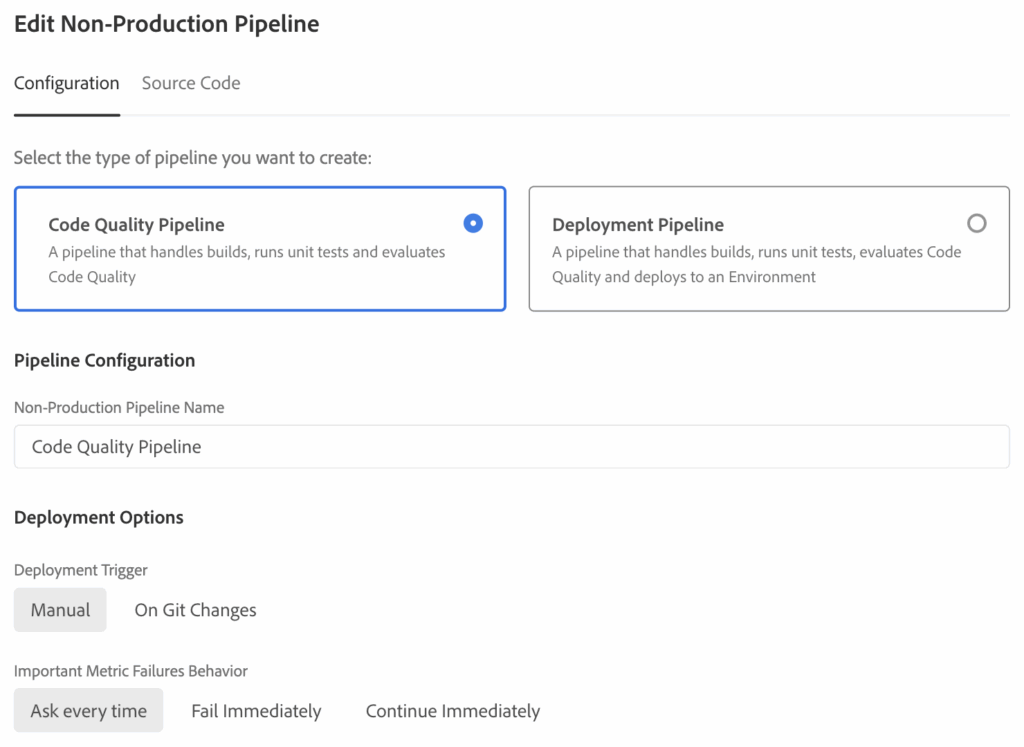
Once configured, build and code scanning results form the main feedback loop, with Code Scanning exposing issues early.
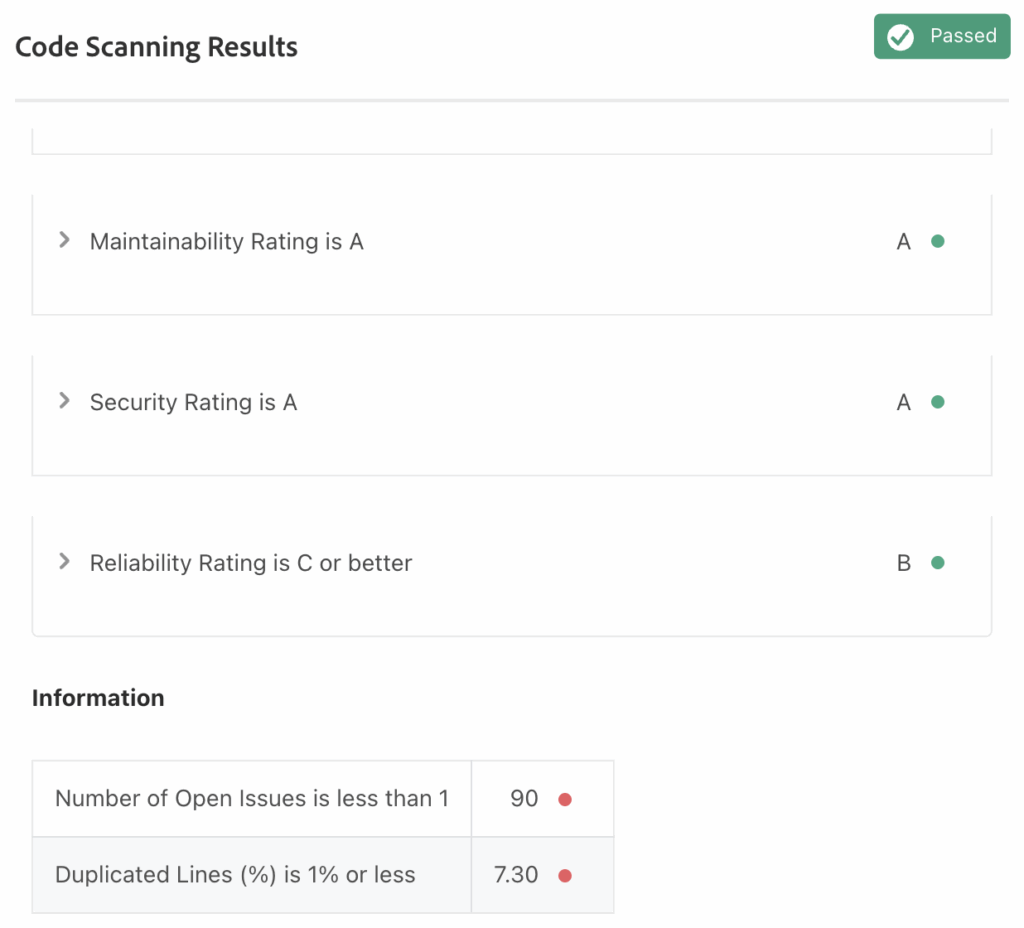
Maintainability and Security score A, while Reliability drops to B due to high issue count and 7.3% duplicated code. Growing complexity should be addressed to keep releases stable.
Let us break this down, starting with key metrics.
Code Coverage is 50% or moreIn typical AEM projects, this structure supports Test-Driven Development (TDD), with tests defined before production logic.
Tests are typically organized under paths such as:
- core/src/main/java/com/<site>/core
- core/src/test/java/com/<site>/core
This separation ensures that production code and test code are clearly structured and easy to maintain.
During this stage, it is important not to disable tests by using options such as -DskipTests when running mvn clean install -PautoInstall…, so that test coverage can be properly evaluated.
core/target/site/jacoco/index.htmlFrom there, improve unit tests until coverage exceeds 85%, keeping the codebase clean and safe to change.
Once the backend is stable, shift focus to the UI front end, where modern tooling supports both TypeScript and JavaScript.
ui.frontend/.eslintrc.jsThis configuration enables front-end linting, testing, and static analysis as the first line of defense.
Reducing duplication also depends on core design principles, such as:
- Single Responsibility Principle (SRP)
- Separation of Concerns (SoC)
- DRY (Don’t Repeat Yourself)
- Composition over Inheritance
- Dependency Inversion (sometimes)
Finally, pay close attention to OSGi configuration. If configurations are not aligned with how AEMaaCS expects them, pipeline failures can occur even when the code itself looks correct.
This is especially common with OIDC, SAML, or other integrations that behave differently in AEMaaCS compared to On Premise setups.
Why Branch-to-Environment Mapping Matters in AEMaaCS
In practice, teams coming from platform-agnostic CI/CD systems often treat branches as indicators of purpose rather than environment.
- Branches represent product features, ERP modules, SaaS capabilities, or enhancement streams
- Branch naming reflects what is being built
- Pipelines decide where and how deployments occur
- Environments are loosely coupled and driven by configuration
The diagram below illustrates this approach, where deployment flexibility is prioritized over strict branch ownership.
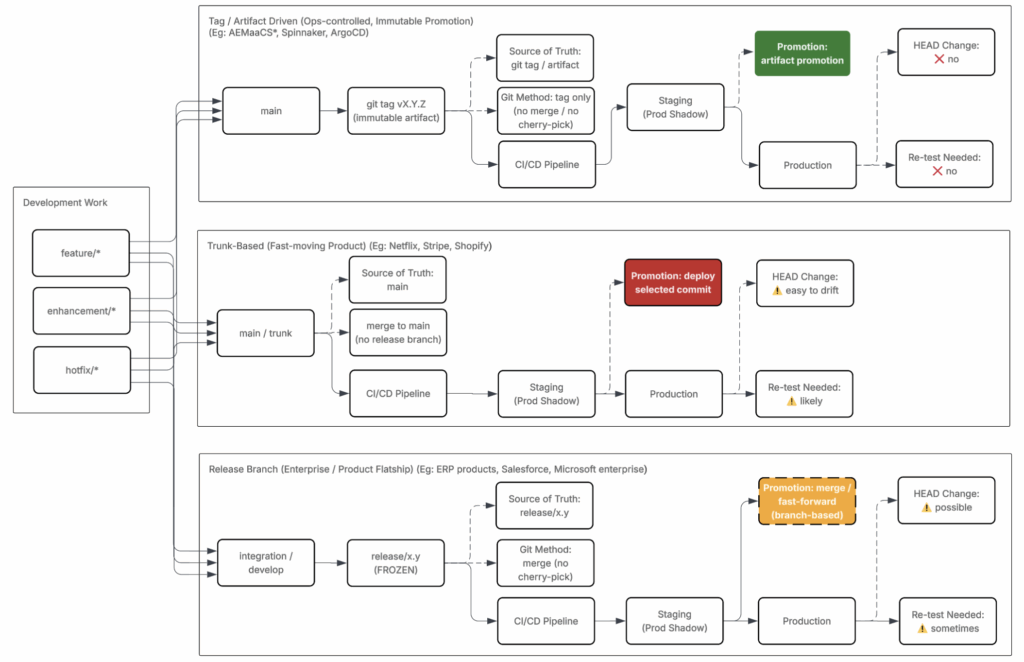
From the diagram above, notice the progression from green to yellow to red states:
- Green — safer, predictable deployment paths
- Yellow — growing coupling and operational risk
- Red — high complexity, late-stage failures
This progression highlights how risk increases as systems scale. Branch responsibility begins to directly impact environment stability—especially when moving toward Cloud Service models such as AEMaaCS.
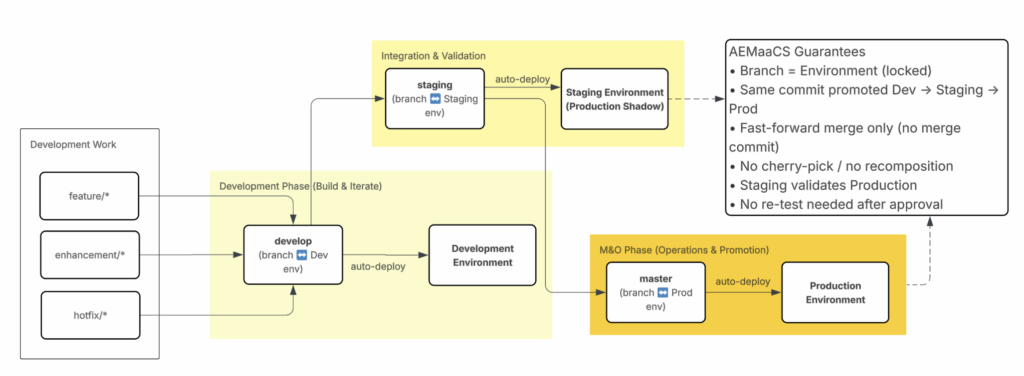
The next diagram shows how this concept applies specifically to AEM as a Cloud Service, where flexibility is intentionally reduced.
- Branch responsibility is fixed and explicit
- Each branch maps directly to one environment
- Promotion to production follows a controlled, predictable path
- Code moves linearly from Development → Staging → Production
This model makes promotion intent clear and enforces early validation.
As shown above, different merge strategies fit different team sizes and delivery models.
Fast-forward merges work well when:
- Teams are small or work solo
- Feature branches are short-lived
- Commit history clarity is prioritized
Merge commits with squash strategies work better when:
- Multiple features run in parallel
- Branches live longer
- Context preservation matters for audits or incident analysis
Squashing consolidates intent into single commits, reduces noise, and avoids fragmented history. This approach supports structured promotion across environments while maintaining traceability and operational safety.
With branching and merge strategy in place, focus shifts to branch alignment with environments in AEMaaCS.
Branch and pipeline flow:
master→ Production Pipeline → Production environment (after approval)develop→ Non-Production Pipeline → Development environmentstaging→ Production Pipeline → Staging environment
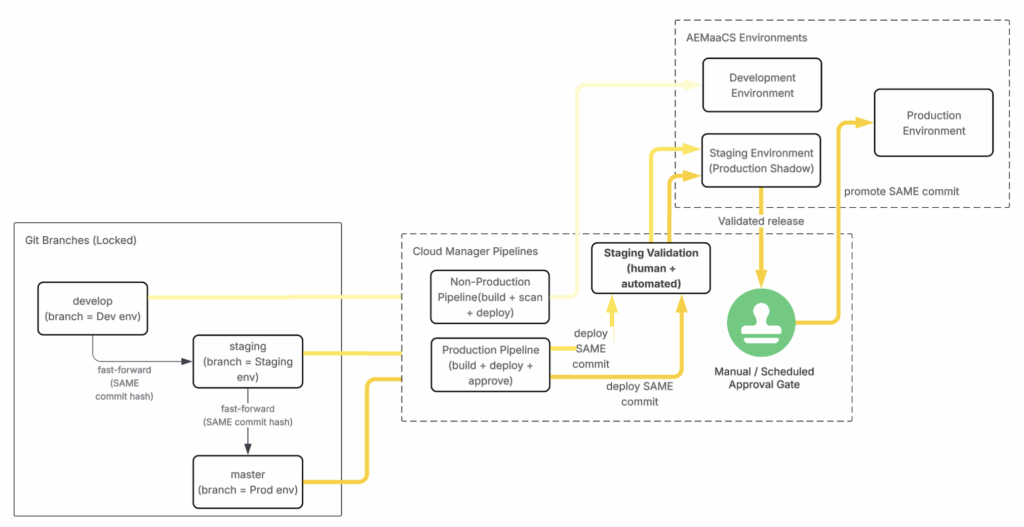
From diagram above, configuration must remain fully dynamic rather than static.
Configuration principles:
- Front-end settings (
.env) must remain environment-driven - OSGi configuration (
.cfg.json) must resolve per environment - Branch deployment must not alter environment-specific configuration
Example: Amazon Cognito environment isolation
- No shared credentials across Development, Staging, Production
- Separate user pool configuration per environment
COGNITO_REGION =
COGNITO_USER_POOL_ID =
COGNITO_CLIENT_ID = Configuration isolation becomes critical during AEM releases.
Why this matters:
- Adobe regularly rolls out updates across environments
masterbranch treated as source of truth for Production deployments- Shared config files (for example,
ui.frontend/.env) can override staging behavior
Strict configuration isolation prevents configuration drift during automated releases and pipeline re-runs. Focus now moves to next area where this behavior surfaces in pipelines.
When an AEM Release Turns a Green Pipeline Red
At this stage, it is important to clarify what a green pipeline actually means. Green status confirms technical validation only—it does not guarantee configuration intent remains correct across environments. This explains why issues often appear later, even after successful releases.
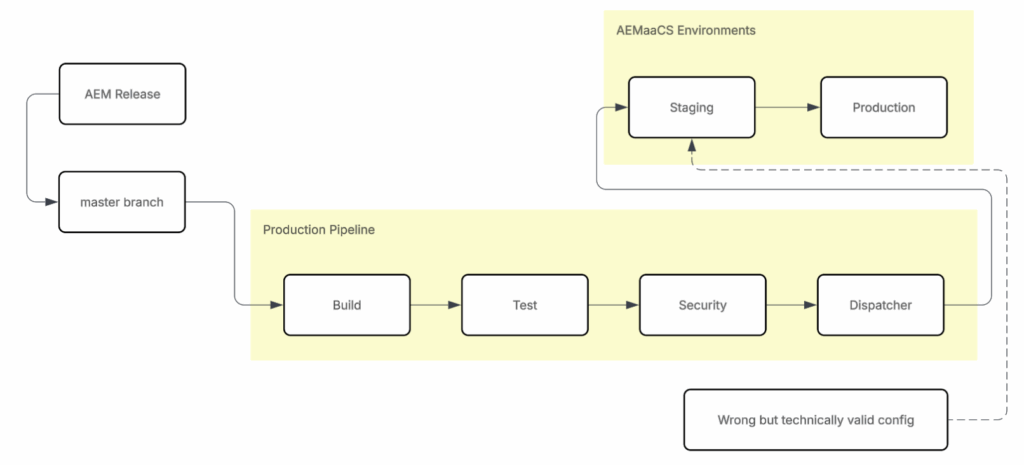
In many projects, Development and Operations complete work successfully. Pipelines stay green, releases move forward, and systems appear stable. Later, teams or clients return to Staging for regression or follow-up testing.
This is where the problem usually begins.
During Adobe-managed AEM releases, Production Pipeline may automatically re-run using master branch as part of platform updates, treated as Production source of truth. That pipeline always deploys to Staging first.
Pipelines validate technical correctness only:
- Build
- Tests
- Security
- Dispatcher
Pipelines do not validate business intent and cannot detect incorrect configuration when configuration remains technically valid.
What typically happens:
- Front-end or OSGi configuration still contains hardcoded values rather than being resolved per environment.
- Configuration works at first, so teams assume it is correct until later pipeline re-runs expose the issue.
- Production configuration is applied in Staging, changing behavior without code changes.
Result:
- Pipeline remains green
- No code changes involved
- Staging behavior changes unexpectedly
- Clients encounter Staging issues with no visible cause
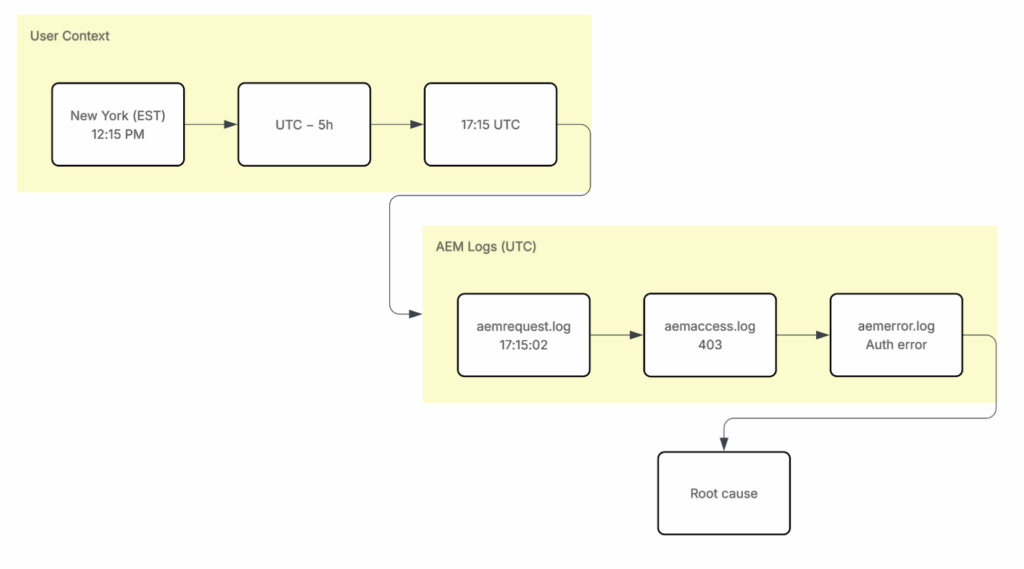
When Staging issues occur, pipeline status is no longer enough. Teams investigate runtime behavior by tracing user activity through AEM logs: aemrequest → aemaccess → aemerror.
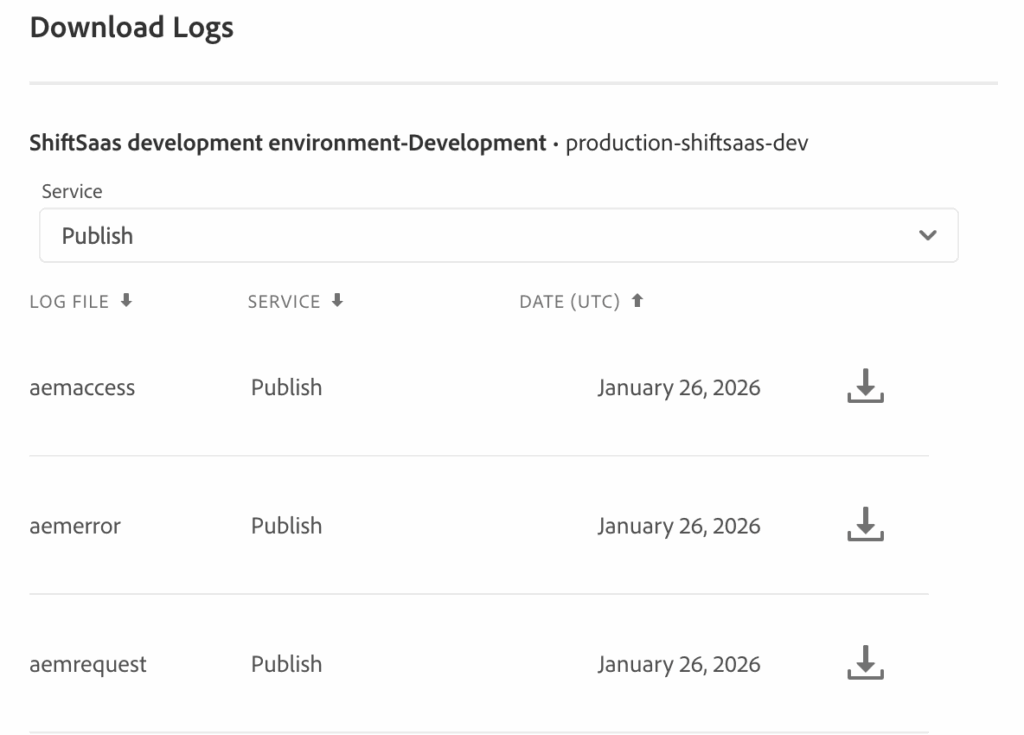
For example, reported incidents from New York are converted to UTC and cross-referenced with AEM logging data to determine the exact request and failure point.
One key limitation is log retention. Adobe keeps AEM logs for only a short period (around seven days). After that, historical data is lost, so teams often rely on scheduled exports or DevOps support for long-term retention.
It is also important to note that AEM logs reflect system behavior, not full user journeys. Some teams add custom application logging for deeper insight, but this must be done carefully due to performance and security impact.
Passing the Pipeline Doesn’t Mean You Passed Performance
Green pipeline in AEMaaCS shows deployment success only. It does not reflect runtime performance, traffic load, or user experience. Adobe pipeline feedback focuses on stage execution, not real usage behavior. Performance signals usually appear later, after system receives real business traffic.
When those signals surface, performance issues are already embedded in architecture. Fixing them requires deeper coordination with Adobe and often structural changes.
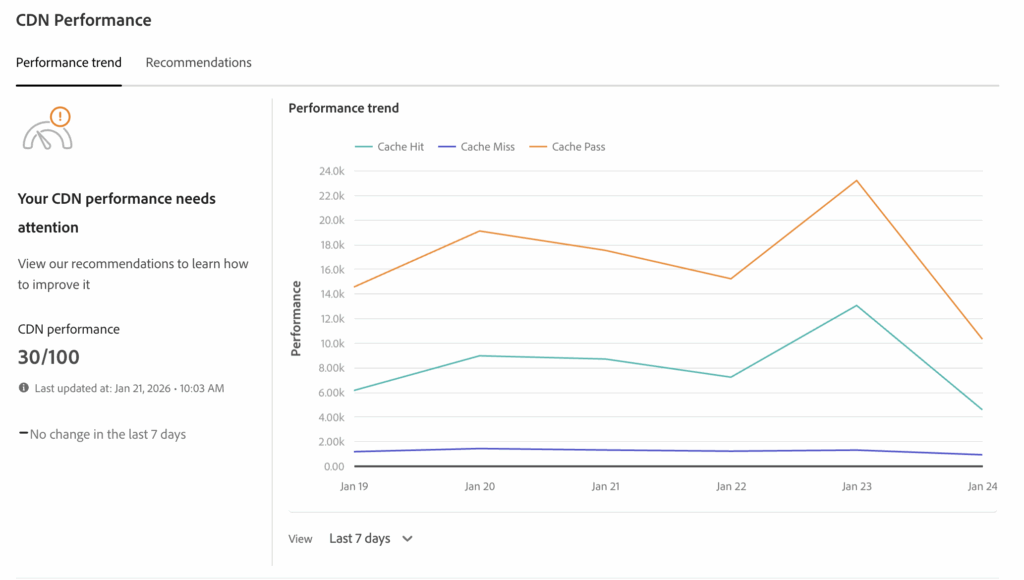
Low cache HIT ratio appears despite successful deployments. CDN metrics often expose performance reality earlier than pipeline status.
Before deeper investigation, baseline checks must be completed. Cache HIT, MISS, and PASS behavior should be reviewed first. Dispatcher configuration must be validated locally, then tested again in AEMaaCS. Results must align with Cloud Manager expectations before CDN metrics are trusted.
Reference: https://medium.com/@shitsoos/validate-aem-dispatcher-locally-like-cloud-manager-25249b64fb19
Once cache layer is addressed, orchestration becomes next risk area.
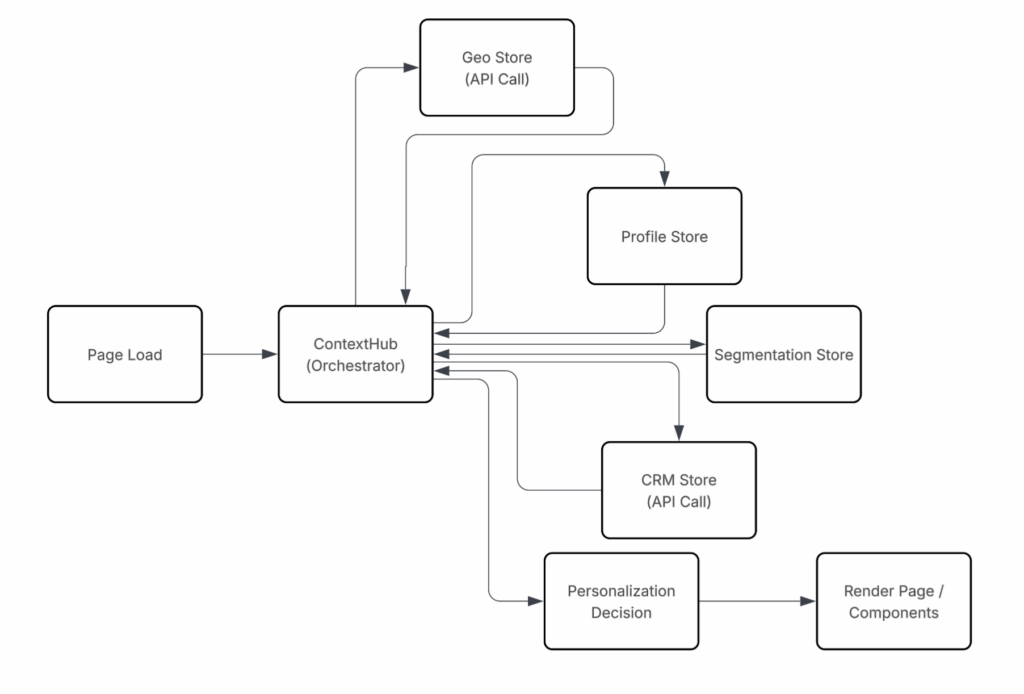
Page rendering depends on multiple data stores and API calls. Render time increases as orchestration layers grow, even when pipeline remains green.
ContextHub itself is not problem source. Issue appears when orchestration owns too many responsibilities. Performance improves when orchestration logic is reduced, moved closer to data source, or delayed until data is actually needed.
Another common issue appears when time-growing data enters critical rendering path.
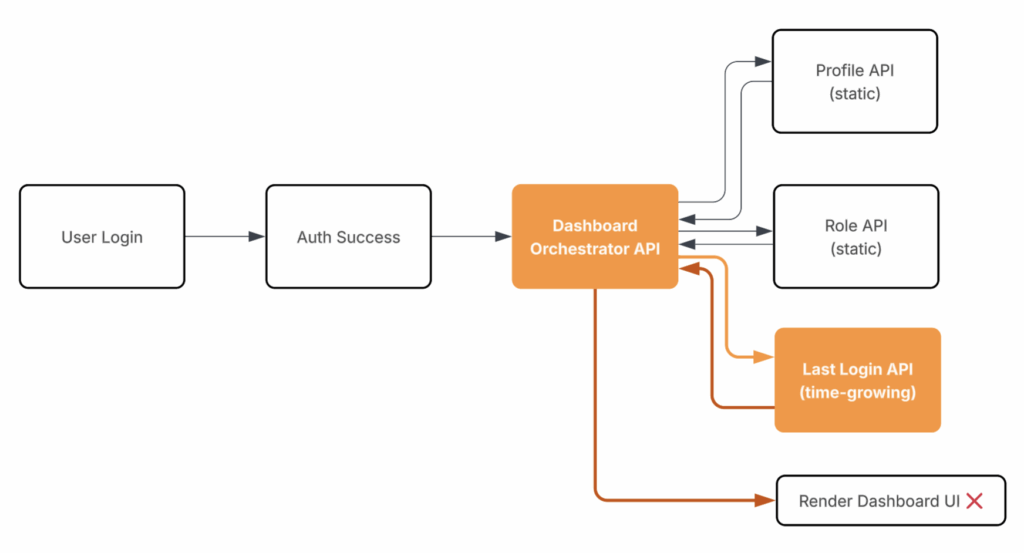
Dashboard rendering becomes blocked by fields such as “Last Login Date.” What starts small becomes slow as data grows over time.
As system scales, query volume increases, serverless execution slows, and timeouts rise. Temporary fixes may hide issue, but architecture remains fragile.
Sustainable performance improvement requires rethinking when data loads, how deep dependencies go, and whether data is truly required at that moment in user journey.
Green pipeline is necessary. It is not proof of performance.
Wrapping up
Green pipeline in AEMaaCS confirms deployment success. It does not guarantee configuration correctness, environment alignment, runtime behavior, or long-term performance. Pipeline failures, staging regressions, and performance issues point to one reality: pipeline validates technical compliance, not system quality.
Hidden issues usually surface when:
- Code quality declines,
- Configuration leaks across environments,
- Orchestration grows unchecked,
- Data patterns change over time.
These problems rarely appear during early pipeline runs. They emerge later under real traffic, real releases, and operational pressure.
Pipeline status should be treated as early signal, not final verdict. Sustainable delivery depends on disciplined branching, strict configuration isolation, sound architecture, and validation beyond CI/CD.
What’s next
Pipeline failures, staging regressions, and performance issues usually signal deeper problems in code structure, test discipline, and early design decisions.
Next article focuses on unit testing as foundation of code quality in AEM projects, showing how it:
- Exposes design flaws early
- Reduces regression risk
- Improves pipeline reliability
Unit testing provides safety net that supports system evolution as AEMaaCS environments scale.