Centralizing Domain Management in AEMaaCS for Cookie Consent and Tracking
Cookie consent and tracking failed across domains, subdomains, and environments, causing missing data and inconsistent behavior in production.
When integrating with third-party platforms such as Google Search, Google Tag Manager, and OneTrust, the inconsistencies became more visible and started impacting clients.
The root cause was clear:
- No centralized source of truth for domain configuration
- Domains were hardcoded or manually managed
- Consent and tracking logic differed across environments
This article shows how to solve the problem by centralizing domain management and using Service User Mapping in AEMaaCS, demonstrated through a practical OneTrust integration example.
Why Cookie Consent Breaks Across Domains and Environments
When a new domain or subdomain is introduced:
- It must be added manually in OneTrust to enable consent management
- The same domain must be registered in Google Analytics for tracking
- It must also be configured in Google Tag Manager for tag execution
If any of these steps are missed or inconsistent:
- Consent banners may not appear correctly
- Tracking data may be missing or incomplete
In multi-environment setups (e.g., dev, staging, production), this process is repeated for each environment, increasing the likelihood of inconsistencies.
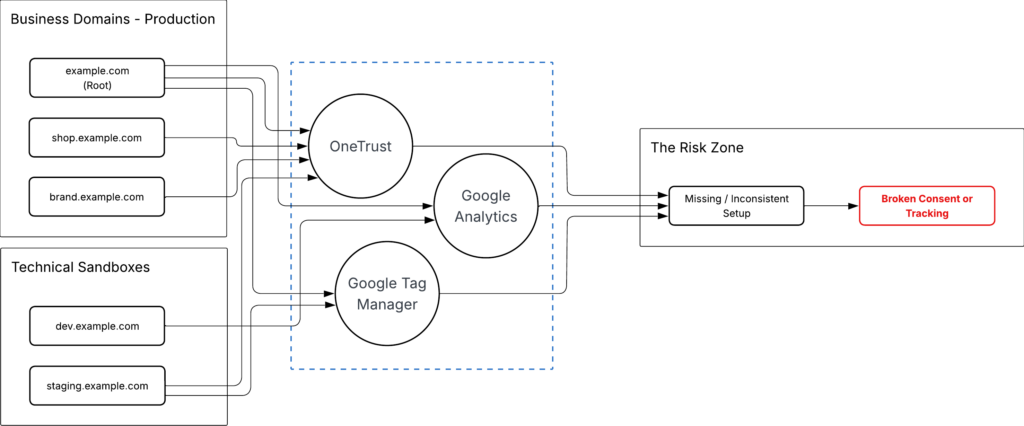
These inconsistencies show up as runtime failures.
Missing or misaligned domain in OneTrust causes consent script to fail loading:
cdn.cookielaw.org/consent/<domain-id>/OtAutoBlock.js:1
Failed to load resource: the server responded with a status of 404 ()This happens when:
- Domain is missing in OneTrust
- Domain ID does not match the current environment
- Configuration changes are not applied across environments
As a result:
- Consent scripts do not load
- Cookie blocking does not execute correctly
- Tracking data becomes missing or inconsistent
Configuration drift becomes a visible production issue.
Why Domain Data Is Split Between CDN and AEM
Domain resolution happens in AEM — but domains themselves originate outside AEM.
CDN routes incoming requests, Dispatcher forwards them, and AEM maps the domain to content using /etc/map.
AEM does not define domains — it defines how domains behave.
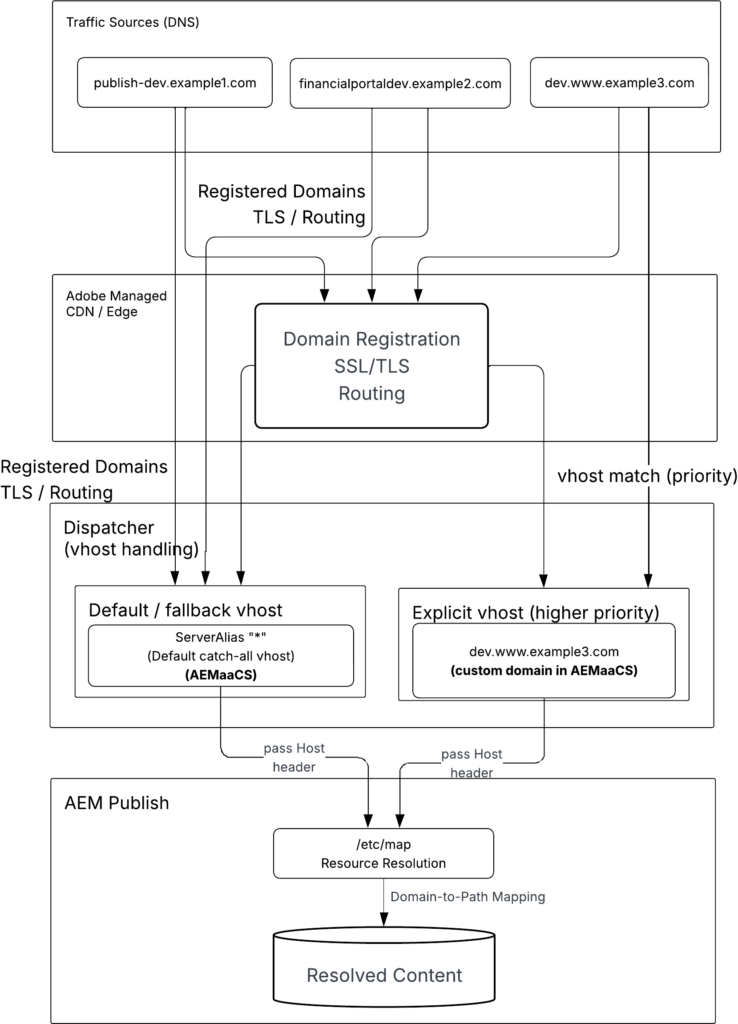
/etc/map does not contain all domains.
Business domains and subdomains are defined at the CDN or DNS layer and may not appear in AEM.
Domain data is split:
- CDN / DNS → full domain list (source)
/etc/map→ mapping logic (behavior)
Domain data is split across systems, which makes consistent configuration difficult.
👉 It is centralized in AEM and combined with mapping logic.
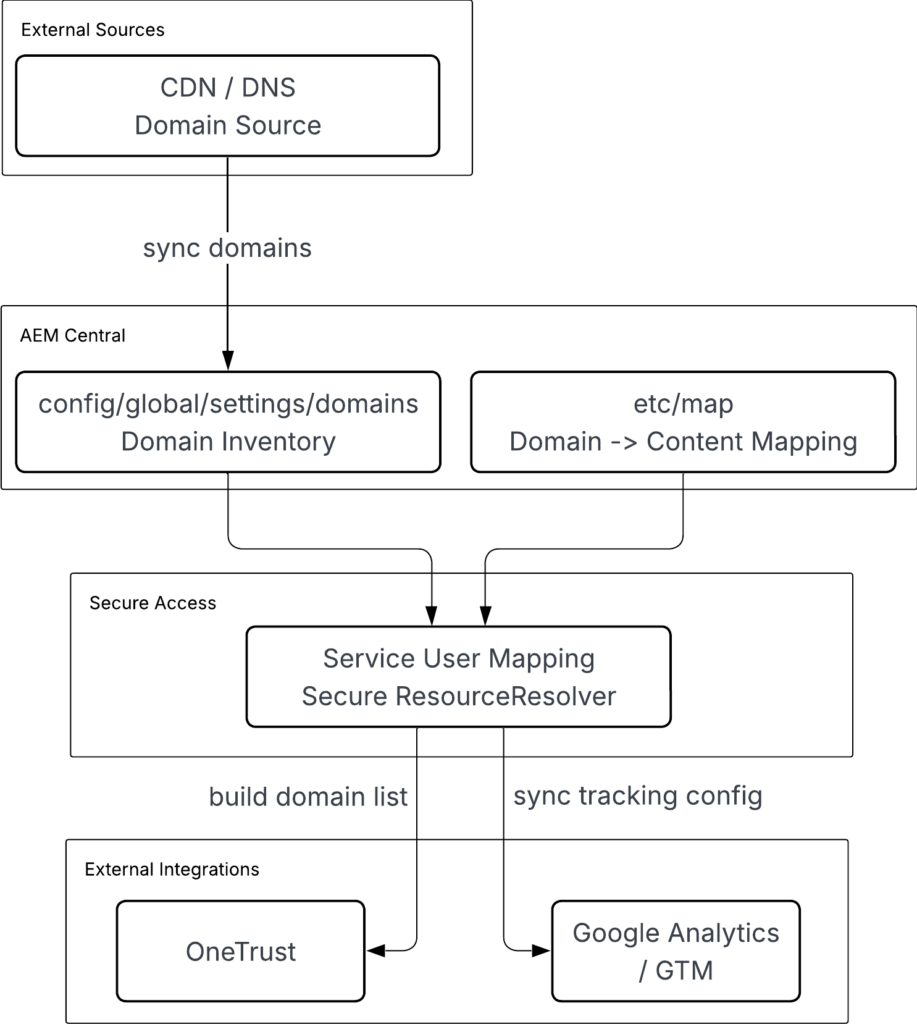
Domains from CDN/DNS are synchronized into AEM (/conf) and combined with /etc/map.
Service User Mapping provides secure access to both sources. AEM becomes the integration layer for domain data.
In complex setups, subdomains may be delegated to different DNS providers. This further fragments domain sources and reinforces the need for a centralized domain inventory inside AEM.
How to Configure Service User Mapping for JCR Access
AEM resolves domains through ResourceResolver. It reads /etc/map, matches incoming Host, and maps request to content.
Any logic accessing JCR content (such as /etc/map) must go through ResourceResolver.
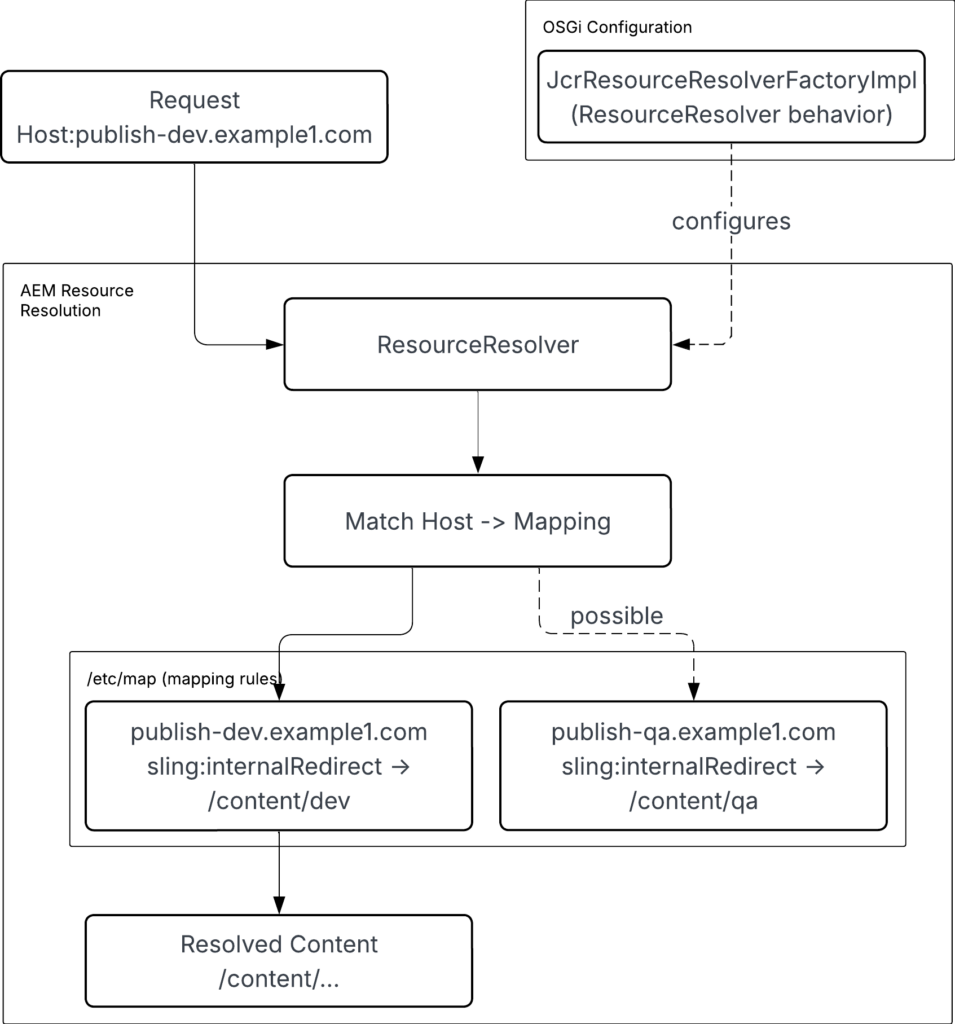
Domain mapping reads /etc/map from JCR using the ResourceResolver.
In AEM as a Cloud Service:
- AEM blocks admin resolvers
- AEM deprecates
getAdministrativeResourceResolver - AEM enforces secure, permission-based access
Service User Mapping allows application code to access /etc/map using a system user.
It defines how code interacts with JCR repository securely.
bundle → subservice → system user → JCR accessConfigured in:
org.apache.sling.serviceusermapping.impl.ServiceUserMapperImpl.cfg.jsonFormat:
<bundle-symbolic-name>:<subservice-name>=[service-user]In AEM as a Cloud Service, service users are created using repository initialization or OSGi configuration.
OSGi configuration:
com.adobe.acs.commons.users.impl.EnsureServiceUser-<site>.cfg.jsonExample configuration:
{
  "operation": "add",
  "principalName": "shiftsaas-service-user",
  "ensure-immediately": true,
  "aces": [
    "type=allow;privileges=jcr:read;path=/etc/map.dev",
    "type=allow;privileges=jcr:read;path=/etc/map.stage",
    "type=allow;privileges=jcr:read;path=/etc/map.prod"
  ]
}This configuration creates service user and grants read access to /etc/map across environments. Next, map service user to subservice for use in application code.
{
  "user.mapping": [
    "shiftsaas.core:readService=[shiftsaas-service-user]"
  ]
}You can check this in:
/useradmin→ locate the service user/crx/de→ confirm permissions under/home/users/...
Service user must have read access to /etc/map to match domains to content paths.

⚠️ Do not use =service-user. Adobe deprecates this approach. Use [service-user] list format in Service User Mapping configuration: Best Practices for Sling Service User Mapping and Service User Definition
With this setup, code reads domain mappings from AEM and synchronizes them with OneTrust.
How to Sync AEM Domains to OneTrust Automatically
With service user mapping in place, code uses subservice to obtain ResourceResolver and access domain mappings.
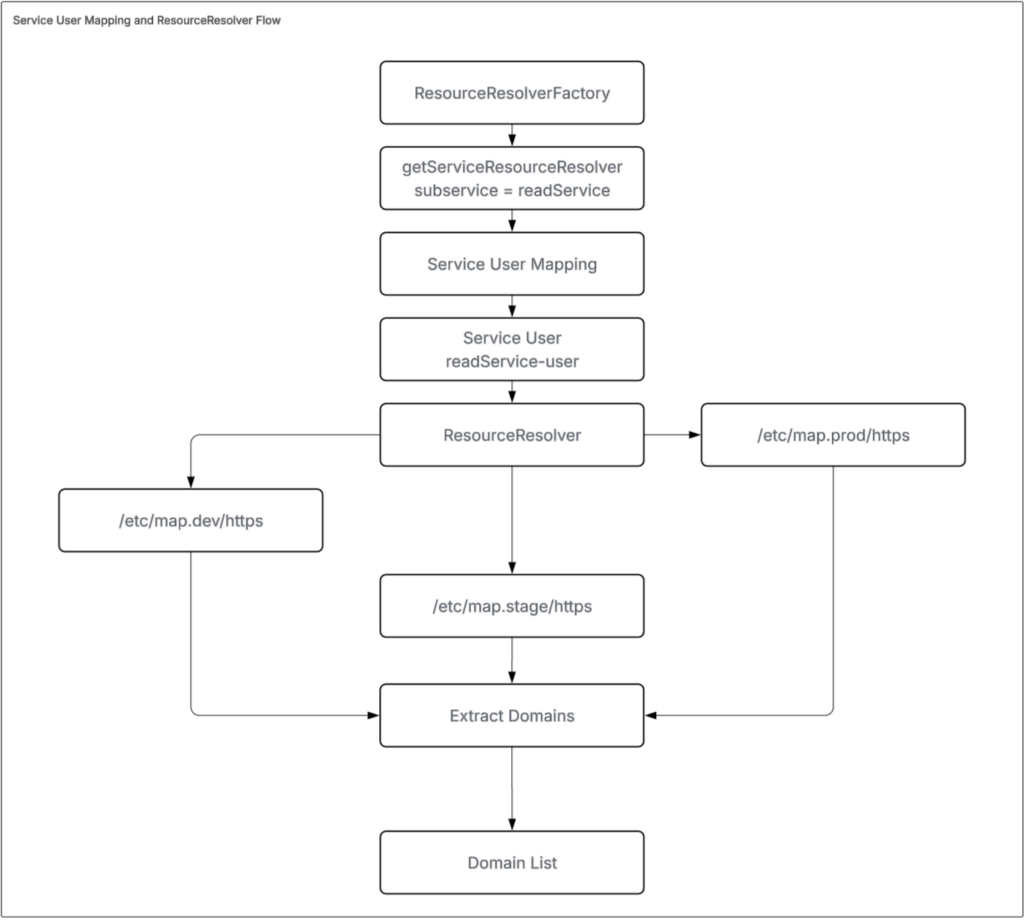
Implementation below shows how code uses ResourceResolver from subservice to read /etc/map paths and collect domain values.
@Override
public List<String> getDomains() {

    Set<String> domains = new HashSet<>();

    try (ResourceResolver resolver = getServiceResolver()) {

        for (String path : MAP_PATHS) {
            Resource mapRoot = resolver.getResource(path);

            if (mapRoot == null) {
                LOGGER.debug("Map path not found or not accessible: {}", path);
                continue;
            }

            for (Resource child : mapRoot.getChildren()) {
                String domain = child.getName();

                if (isValidDomain(domain)) {
                    if (domains.add(domain)) {
                        LOGGER.debug("Found domain: {} (from {})", domain, path);
                    }
                }
            }
        }

    } catch (Exception e) {
        LOGGER.error("Error reading domains from map paths: {}", Arrays.toString(MAP_PATHS), e);
    }
    return new ArrayList<>(domains);
}

private ResourceResolver getServiceResolver() throws LoginException {
    Map<String, Object> params = new HashMap<>();
    params.put(ResourceResolverFactory.SUBSERVICE, "readService");
    return resolverFactory.getServiceResourceResolver(params);
}After collecting domains, integration with OneTrust can begin. This replaces manual updates by syncing domain lists through APIs.
Use the following request to retrieve an access token:
curl -X POST "https://<your-tenant>.onetrust.com/api/access/v1/oauth/token" \
  -H "Content-Type: application/x-www-form-urlencoded" \
-d "grant_type=client_credentials&client_id=<CLIENT_ID>&client_secret=<CLIENT_SECRET>"Store configuration in Adobe Cloud Manager (or another secure source) so values can change per environment.
Define a config file:
com.<site>.core.config.OneTrustConfig.cfg.jsonProvide environment-specific values such as tenant URL, client credentials, and domain ID.
Example configuration:
{
  "tenantUrl": "$[env:ONETRUST_TENANT_URL]",
  "clientId": "$[secret:ONETRUST_CLIENT_ID]",
  "clientSecret": "$[secret:ONETRUST_CLIENT_SECRET]",
  "domainId": "$[env:ONETRUST_DOMAIN_ID]"
}Build API endpoints from these values:
this.domainGroupEndpoint = this.tenantUrl + "/api/cookiemanager/v1/domains";
this.publishEndpoint = this.tenantUrl + "/api/cmp/v1/domains/publish";Send collected domains to OneTrust:
curl -X POST "https://<your-tenant>.onetrust.com/api/cookiemanager/v1/domains/<DOMAIN_ID>/domaingroup" \
  -H "Authorization: Bearer <ACCESS_TOKEN>" \
  -H "Content-Type: application/json" \
  -d '{
        "overwrite": false,
        "domains": [
          "example.com",
          "test.example.com"
        ]
}'Trigger publish to apply the changes:
curl -X PUT "https://<your-tenant>.onetrust.com/api/cmp/v1/domains/publish?website=<DOMAIN_ID>&scriptType=production" \
  -H "Authorization: Bearer <ACCESS_TOKEN>" \
  -H "Content-Type: application/json" \
-d '{}'A successful request returns:
{
  "responseMsg" : "Publish initiated successfully!",
  "publishVersion" : "202511.1.0",
  "consentPolicyName" : "All Audiences",
  "autoBlocking" : false,
  "reconsentRequired" : false,
  "publishedDate" : "2026-03-11T23:28:24.713+00:00",
  "userName" : "20B795CC-1155-413C-C40D-CB4BAAA75F11"
}autoBlocking controls script generation; when it is false, the script is not available at:
https://cdn.cookielaw.org/consent/{domainId}/OtAutoBlock.jsRequests to this file return a 404 error, for example:
gtm.js?id=GTM-WSGBSW…m_cookies_win=x:249
 GET https://cdn.cookielaw.org/consent/{domainID}/OtAutoBlock.js net::ERR_ABORTED 404 (Not Found)
Zc	@	gtm.js?id=GTM-WSGBSW…m_cookies_win=x:249
WQ	@	gtm.js?id=GTM-WSGBSW…m_cookies_win=x:932
YQ	@	gtm.js?id=GTM-WSGBSW…m_cookies_win=x:934
(anonymous)	@	gtm.js?id=GTM-WSGBSW…m_cookies_win=x:342
k.apply	@	gtm.js?id=GTM-WSGBSW…m_cookies_win=x:266
eb	@	gtm.js?id=GTM-WSGBSW…m_cookies_win=x:230
db	@	gtm.js?id=GTM-WSGBSW…m_cookies_win=x:230
Ee	@	gtm.js?id=GTM-WSGBSW…m_cookies_win=x:293
k.apply @ gtm.js?id=GTM-WSGBSW…m_cookies_win=x:266Allow time for CDN propagation, then verify:
https://cdn.cookielaw.org/consent/{domainId}/domain-list.jsonIf checked too early, the CDN may return an error such as:
<?xml version="1.0" encoding="utf-8"?><Error><Code>BlobNotFound</Code><Message>The specified blob does not exist.
RequestId:56953696-901e-0046-3179-c24d1c000000
Time:2026-04-02T08:22:35.2985089Z</Message></Error>To confirm the domain is published, check:
https://cdn.cookielaw.org/consent/<domainID>.jsIf the file loads successfully, the publish is complete. For additional confirmation, check the OneTrust Dashboard UI.
Before automating this flow, validate the integration using a servlet.
Expose a temporary servlet endpoint to execute the full flow manually, including:
- Collecting domains from AEM
- Calling OneTrust APIs
- Triggering publish
This allows you to verify behavior step by step and ensure the status is correct, avoiding cases where the system remains in an incomplete or inconsistent state.
Example servlet:
@Component(
        name = "OneTrust Testing Servlet",
        immediate = true,
        service = Servlet.class,
        property = {"sling.servlet.methods=GET", "sling.servlet.paths=/bin/onetrust/sync"})
public class OneTrustTestServlet extends SlingSafeMethodsServlet {

  @Reference
  private SampleDomainProvider domainProvider;

  @Reference
  private SampleOneTrustIntegrationService integrationService;

  @Override
  protected void doGet(@NotNull SlingHttpServletRequest request, SlingHttpServletResponse response)
          throws IOException {

      // Your implementation
  }
}Resolve all @Reference dependencies so servlet becomes Active. Missing dependencies keep it in Satisfied state, and endpoint will not work. Check
/system/console/componentsbefore testing.
After validation, move logic to scheduler and configure scheduler:
com.<site>.core.schedulers.OneTrustScheduler.cfg.jsonExample:
{
  "enabled": true,
  "scheduler.expression": "0 0 2 * * ?"
}Adjust configuration through Adobe Cloud Manager or /system/console/configMgr when running on on-premise environments.
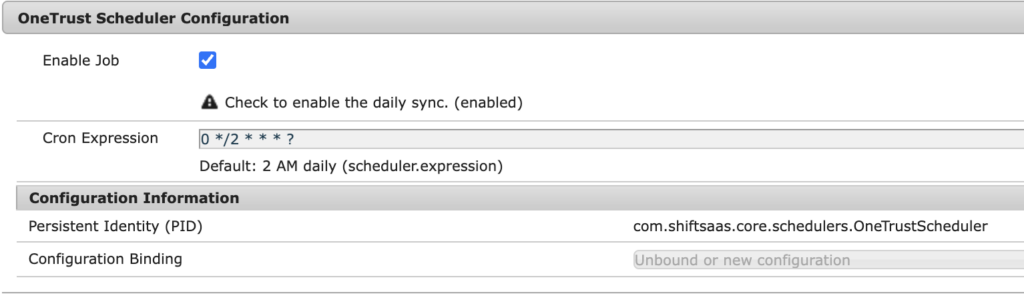
Use scheduler to run sync automatically based on environment needs.
@Component(
        service = Runnable.class,
        property = {
                "scheduler.expression=[$config:scheduler.expression]",
                "scheduler.concurrent:Boolean=false",
                "scheduler.runOn=LEADER"
        },
        immediate = true
)
@Designate(ocd = OneTrustScheduler.Config.class)
public class OneTrustScheduler implements Runnable {

    private static final Logger LOGGER = LoggerFactory.getLogger(OneTrustScheduler.class);

    @Reference
    private SampleOneTrustIntegrationService integrationService;

    @Reference
    private SampleDomainProvider domainProvider;

    private volatile boolean enabled;

    @Activate
    @Modified
    protected void activate(Config config) {
        this.enabled = config.enabled();
        LOGGER.info("OneTrust Scheduler initialized. Enabled: {}, Expression: {}",
                this.enabled, config.scheduler_expression());
    }

    @Override
    public void run() {
        if (!enabled) {
            LOGGER.debug("OneTrust Scheduler is disabled, skipping task.");
            return;
        }
        // Execute sync logic
    }

    @ObjectClassDefinition(name = "OneTrust Scheduler Configuration")
    public @interface Config {
        @AttributeDefinition(name = "Enable Job", description = "Check to enable the daily sync.")
        boolean enabled() default true;

        @AttributeDefinition(name = "Cron Expression", description = "Default: 2 AM daily")
        String scheduler_expression() default "0 0 2 * * ?";
    }
}Add dedicated logging to monitor scheduler execution instead of mixing logs in error.log:
org.apache.sling.commons.log.LogManager.factory.config-<site>.cfg.jsonExample:
{
  "org.apache.sling.commons.log.names": [
    "com.shiftsaas.core.schedulers"
  ],
  "org.apache.sling.commons.log.level": "DEBUG",
  "org.apache.sling.commons.log.file": "logs/shiftsaas.log",
  "org.apache.sling.commons.log.additiv": "false"
}
With scheduler and logging in place, domain collection and synchronization run automatically through OneTrust Bulk API, replacing manual updates with a controlled and consistent process.
Key Takeaway
Domain management breaks when consent, tracking, and configuration are handled separately across systems and environments.
- Keep one domain source inside AEM by combining domain input from CDN/DNS with mapping in
/etc/map - Read domain data from JCR through Service User Mapping using a system user with explicit permissions
- Push domain list from AEM to OneTrust using Bulk API instead of adding domains manually per environment
- Test full flow with a servlet to confirm domains are collected, sent, and published correctly
- Move validated logic into a scheduler to run sync automatically
- Store API credentials in Adobe Cloud Manager so each environment uses correct values
- Wait for CDN propagation before checking scripts or domain list to avoid false 404 errors
Controlling domain data in one place and syncing it consistently prevents broken consent, missing tracking, and environment mismatch issues.
What’s next
After fixing domain sync and consent behavior, next step is telling search engines which version of a page belongs to each country or language.
- Add hreflang tags so each page points to its language and regional versions
- Build hreflang values from domains stored in AEM to keep them correct across environments
- Make sure every page includes all alternate versions, including itself
- Match hreflang links with actual domain routing so users and search engines land on the same content
- Check hreflang on live domains after CDN updates to avoid wrong indexing
Correct hreflang setup ensures search engines show the right page for each region and language without conflicts.